In a previous post I talked about how an aspiring digital historian might learn some fundamental software technologies applicable to building a dynamic website. Today I’ll try to better explain how those work together to produce web pages.
In the simplest kind of website, a person using a browser requests an HTML page by clicking a link or typing a URL. The browser then sends that request across the great wide internet to a webserver–a specialized kind of software program living on a network server. The webserver finds the requested HTML file on it’s filesystem and returns it to the requesting browser. The browser interprets the HTML and displays the resulting page on the user’s screen.
Antietam on the Web (AotW), and many other sites, however, need more sophisticated functions than can be provided by plain old HTML. In our case we’ve chosen a combination of tools including PHP and a mySQL database to help get the job done.
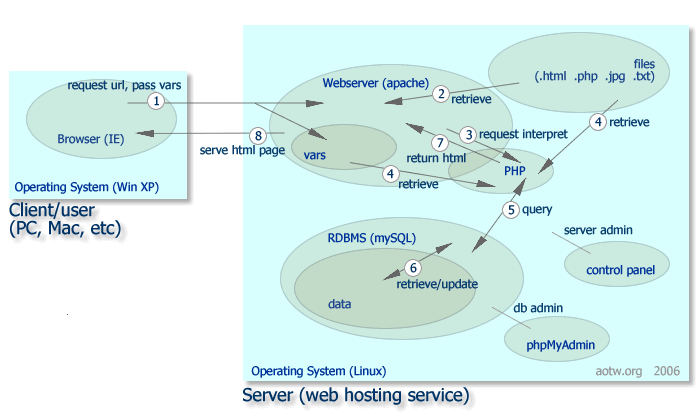
The chart above diagrams some of the relationships among the technlogies we’re talking about. If you are new to this, do not be alarmed, it’s fairly straightforward if you take it one piece at a time. You can click the chart to get a larger version if, like me, your eyesight isn’t what it once was.
To walk through an example of how these work together, I’ll use a popular feature on AotW: Participant search. Users looking for a particular person or military unit enter information like name or military specialty or home state in a form, and click the “search” button.
Follow along with the numbered arrows in the chart as I summarize what happens next …
- The browser makes a request of the web server (for officers.php) and passes along the last_name, first_name and any other values the user typed into the search form.
- The webserver stores the user entries in variables (vars), retrieves the requested PHP file, and takes a look at it. Because the file contains PHP commands, which the webserver doesn’t handle, it passes a request to the PHP ‘engine’ to execute them.
- PHP runs through the sequence of instructions in the officers.php file. In addition to formatting a page in HTML, it will …
- Retrieve information from the variables stored by the webserver, like the last name of the person we seek. It will also read and load other files: the standard header and footer templates and database connection routines, for example.
- The PHP engine will then make a request of the Relational Database Management System (RDBMS), mySQL, to have it search the pile of data for people matching the search criteria. PHP talks to mySQL in the form of a query written in SQL .
- mySQL looks in the data, which contains detailed information about something over a thousand individuals, and returns any records which apply–in a “result set”–back to PHP.
- The PHP engine completes execution of the instructions of officers.php, combines all the information it’s gathered, and returns it all formatted as HTML to the webserver. The type of page created is dependent on the data results. If the result set is empty, PHP delivers the “sorry” screen. If it sees more than one matching record, it builds a list and provides that for further selection by the user. If it finds exactly one, it fills the standard Officers page with all the details about the selected individual.
- The webserver then supplies the HTML page back to the requesting browser.
Voila!
__________________
Next time we’ll discuss how the Digital Historian administers his server, files, and database: looking at the right side of the chart.


Leave a Reply to Doing Digitial History « Bull Runnings Cancel reply